Licenses
✍️ Akansha • 24 November 2026 • 15 min read
FSSAI Licence Approved but Certificate Not Received or Available for Download?
Get Free Consultation
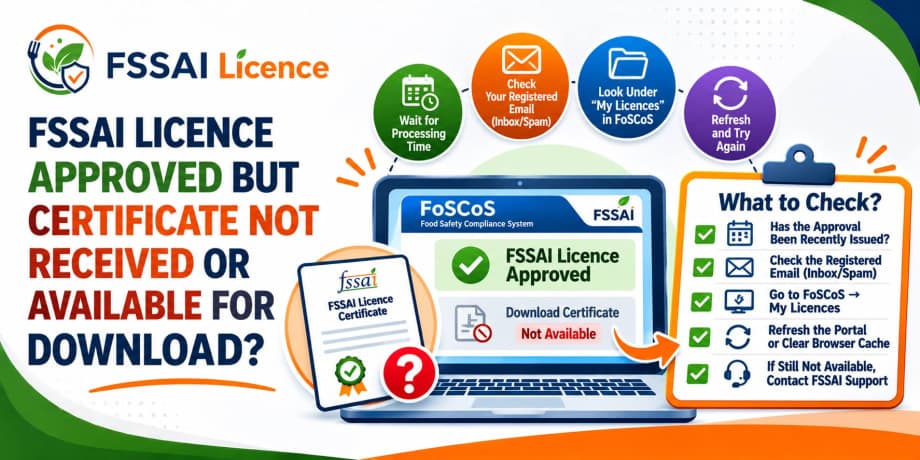
If your FSSAI licence is approved but the certificate has not arrived, look for the issued document in the account used for the application on FoSCoS, the Food Safety Compliance System. If the record is approved but no certificate or download option is available, capture the status and raise the specific issue through the portal’s available support channel or with the relevant licensing authority.
An FSSAI certificate not received on email does not, by itself, tell you whether the document has been issued or whether the difficulty is with delivery, account access or downloading. Use the existing application record first; a missing PDF alone is not a reason to pay for a second food licence application.
1. FSSAI licence approved but certificate not received: what to establish first
1.1 Who can use this recovery route
This guide is for a food business operator who has already submitted an FSSAI registration or licence application and wants to locate the resulting certificate. It also applies when an authorised employee or adviser is handling the recovery for the business. The useful starting point is the application already filed, whether the business is a restaurant, manufacturer, trader, importer or exporter.
The immediate question is not which category to apply for. It is whether the particular application has reached a stage at which an issued document is available, and whether the person looking for it can access the associated record. A business still preparing an application has a different task; FSSAI Registration assistance may be relevant in that situation.
1.2 What the status tells you
An FSSAI licence approved status is a useful signal, but read the wording on the actual application record. An approval message, an issued licence number and a downloadable certificate are related pieces of information; do not assume that seeing one on a message establishes exactly what is available in another screen.
If the record instead shows that an application is under scrutiny or that a response is needed, the matter is still at the application stage. Follow the instruction attached to that record rather than treating the absence of a certificate as a PDF failure. A rejected application likewise needs a different remedy from an approved application with an inaccessible document.
For a food business with more than one premises or application, identify the precise record at issue. A certificate for one location or filing should not be treated as the certificate for another merely because the business name is similar. This distinction matters when an owner manages several outlets or a central office files on behalf of individual units.
2. Information to prepare before you begin
For an existing application, the information below helps locate the record and describe a retrieval problem. These are practical items for this task, not a statutory list of documents that every applicant must upload again.
Application reference number: use it to identify the filing and distinguish it from other applications by the same business.
Business name and premises address as used in the application: use them to recognise the correct record.
Account access details or the identity of the person who filed: use them to reach the relevant application. Keep passwords private.
Available acknowledgement, approval message or licence number: use it to connect the status information to the record you are trying to retrieve.
A dated screenshot of an error or missing option, if one appears: use it to show support what happened without including passwords or one-time codes.
A reference number and an issued licence or registration number are different identifiers. The former points to an application; the latter identifies the licence or registration once issued. Label each accurately in your notes, particularly if an adviser has supplied several numbers in a message.
Keep screenshots as readable image files and existing notices in their original electronic form where possible. For a support request, a short description of the action taken and the resulting screen is generally more useful than forwarding an entire folder of business records. Do not send identity or premises documents unless the support channel or authority asks for them.
3. How to find and download the certificate on FoSCoS
FoSCoS, at foscos.fssai.gov.in, is the FSSAI system to use for the existing application. Portal layouts and labels may change, so the sequence below describes the action to look for rather than promising an identical button name on every screen.
Open FoSCoS and sign in to the account associated with the application.
If a representative filed it, establish which account contains the record before searching.
Open the application or licence area available in the account.
Locate the relevant filing using its reference number and the business and premises details.
Read the latest status and open the relevant record.
Look for an issued certificate, licence, view or download action associated with that record.
If a document opens, use the available download or save action to store the PDF on a device controlled by the business.
Open the saved file to make sure it is readable.
If there is no document action or the action fails, note the exact screen and message.
Use the troubleshooting and support routes below rather than creating another application.
3.1 Use the existing application
For an FSSAI licence status check online, use the tracking or application view offered by FoSCoS. A status search may help identify a filing, but a status result and a certificate download are separate functions. If the portal offers a public tracking facility, do not assume it will also provide the full certificate PDF.
Readers looking for an FSSAI licence download by application reference number should keep that number available for finding or discussing the application. It is not a substitute for account access when the relevant document is available inside the account. Likewise, an FSSAI certificate download without login should not be assumed to be available for every record.
If a consultant holds the filing account, ask for the issued document and a clear handover of the application details. The business should know which email address or mobile contact was used and who can access the record. Account ownership and access should be handled through the portal’s available options; do not exchange passwords or one-time passwords casually.
3.2 Understand the certificate format
A licence certificate is commonly referred to as Form C under the FSSAI licensing framework. A registration certificate is a different document, so an FSSAI registration certificate download should be identified by the type of application and document actually shown, not by expecting every certificate to say Form C.
An FSSAI licence download PDF is useful only if it is the issued document for the intended business and premises. An application acknowledgement, payment receipt or screenshot of an approved status may be useful records, but they are not interchangeable with the certificate. Preserve those supporting records separately rather than renaming them as the licence.
4. When the certificate or download option does not appear
Start with the exact point of failure. A FoSCoS certificate download error after clicking a document is different from a record that cannot be found, and each calls for a different correction.
4.1 Account and record problems
Application absent from the dashboard: establish whether the correct account and filing have been opened. A business may have more than one user or an external representative who submitted the application.
Record visible but no certificate action: note the status and the page on which the action is missing. The appropriate question for support is whether the document has been issued and how it can be accessed for that record.
Access credentials unavailable: use the account recovery route available on the portal or seek a handover from the filer. A licence number alone should not be treated as proof that the full PDF can be retrieved publicly.
Record is not finally approved: read any pending instruction on the application. Addressing a live query or decision is different from fixing a broken download.
4.2 Browser and file problems
If clicking an available action appears to do nothing, look for a blocked pop-up, a new browser tab or a downloaded file in the device’s download folder. A browser may open the PDF in a viewer instead of displaying a separate save prompt. If a file has downloaded but will not open, try a PDF reader or another device before assuming the certificate itself is missing.
A practical FoSCoS certificate download troubleshooting test is to repeat the action in another current browser or on a different device. Record whether the problem occurs before the document opens, while it is opening, or only when saving it. Avoid repeatedly submitting unrelated applications or payments while testing a display problem.
Do not treat an empty screen, a blocked browser window or a missing email as proof that the authority rejected the food licence. Preserve the precise error and ask about the existing record before taking an irreversible step.
If the FSSAI certificate is not showing in the dashboard even though another person can see it, compare which account and record each person opened. If both reach the same record but see different results, include that distinction in the support request. It helps the recipient investigate access or display rather than searching for an entirely new application.
5. How to raise a useful support request
5.1 What to send
Use the support or contact route available on FoSCoS, or approach the licensing authority associated with the application if that is the appropriate channel shown for the matter. The FSSAI website, fssai.gov.in, is the official starting point for authority information. Describe the problem as a request for access to an existing certificate, not as a new licence application.
State the application reference, business name, premises address, application type and the status visible to you. Then describe the failed action in one sentence: for example, that the record is visible but no document action appears, or that clicking the action produces a specified error. Attach the relevant screenshot if the channel accepts attachments.
Ask a question the recipient can answer: has the certificate been issued for this application, and what is the appropriate way to obtain it? If it has been issued, ask where the business should access the document. If it has not, ask whether any action is pending on the application.
5.2 How to follow up
Keep a copy of the message, the date sent and any support reference provided. If a response asks for clarification, answer against the same request so the history stays together. Where the response points to an application query, deal with that query through the channel specified for it rather than sending sensitive material to an unrelated address.
A suspected FSSAI certificate generation delay should be described as an observed gap, not as a diagnosis of the portal. For example, say when the approved status was observed and that the document was not visible when you attempted access. That gives support a useful sequence without asserting a cause you cannot see.
Before paying someone to follow up, agree on what they will do: locate the existing application, communicate with support, retrieve the document if available, or advise on a separate application issue. Ask how you will receive updates and the final records. Never share passwords or one-time codes in an open support message.
6. Government charges, professional fees and timing
6.1 Identify what you are paying for
Separate the cost of a government application from a private service charge. A professional may quote for account assistance, reviewing an application, follow-up or other work; that quote is not itself an FSSAI government fee. Ask for an itemised description before authorising payment.
Cost question | What to establish |
|---|---|
Existing certificate retrieval | Whether the portal shows any official charge for the specific action. Do not assume a private download charge is a government charge. |
New application or other filing | Whether a separate filing is actually needed and what official amount the portal displays for that transaction. |
Professional assistance | The service scope, quoted fee, any taxes or additional charges, and whether follow-up and handover are included. |
The applicable government amount for a filing depends on the transaction and its circumstances. The supplied official material does not establish a current download charge or a reliable fee schedule for every case, so a numerical food licence fee would be misleading here. Use the amount shown for the actual transaction rather than treating a service-provider quote as an official receipt.
6.2 Set a realistic follow-up point
There are several separate milestones: application review, the decision on the application, availability of an issued document, and the time taken to resolve an access problem. The time for one should not be presented as a promise for another. A browser correction can be immediate, while a support request depends on the issue and the response channel.
No verified universal benchmark for certificate availability after an approved status is available in the supplied evidence. Record the date you observed the status, the date of your attempted download and the date of any support request. If the portal or authority gives a specific instruction for your case, use that instruction to plan the next follow-up.
7. Check the certificate after downloading it
7.1 Match the document to the business
Read the document itself before distributing it to a landlord, customer or internal team. Start with the name of the food business operator and the premises address. These details help establish whether the file belongs to the business and location for which it will be used.
Then inspect the licence or registration number, the type of authorisation and the activities or conditions stated in the document. A manufacturer and a trader may need to pay attention to different descriptions of their activities; an operator with several outlets needs the certificate for the relevant premises. Do not infer that an activity is covered merely because it is carried on by the same company elsewhere.
Review the validity information and any conditions on the certificate and accompanying pages. Save the complete document, not just a cropped image of the number. A complete copy is more useful when a recipient needs to read the scope or conditions rather than merely identify the business.
7.2 Handle an apparent discrepancy
If a detail appears wrong, compare it with the submitted application and supporting records before deciding what needs correction. A typing error in a file name is different from an incorrect business detail on the issued document. Keep the original PDF unchanged so there is a clear record of what was issued.
For a discrepancy on the certificate, use the relevant FoSCoS or licensing-authority route for the nature of the issue. A correction or modification may involve a separate procedure; downloading a new copy does not necessarily change the underlying record. Do not edit the certificate PDF yourself to make it match another document.
8. Post-issue actions for the food business
Once the document is available, make it usable at the premises and retain it as part of the business’s compliance records. These actions are separate from the technical act of obtaining the PDF.
Display the licence or registration certificate as applicable under the FSSAI licensing and registration framework. Use a legible copy at the relevant premises.
Keep the original electronic file in a business-controlled location, with a backup accessible to the person responsible for compliance.
Maintain the application acknowledgement and relevant correspondence alongside, but separate from, the issued certificate.
Review the certificate conditions and applicable food safety requirements for the actual activities carried on at the premises.
Assign responsibility for monitoring validity and future filings so that access does not depend entirely on an employee or adviser who may leave.
The display obligation is a regulatory requirement; keeping a backup and naming a records owner are practical controls. The Food Safety and Standards Act, 2006, including Section 31 on licensing and registration, and the applicable FSSAI regulations provide the legal framework. An issued document should be read with its conditions and the rules applicable to the operation.
If the business changes its activities or particulars, do not assume that the existing certificate automatically reflects that change. Assess the applicable procedure for the change separately. Retrieving a PDF solves access to a record; it does not itself update the underlying authorisation.
9. Choose your next three actions
Locate the existing application in FoSCoS and determine whether the certificate is available for that specific business and premises.
If access fails, identify the failed step and send a focused request with the application reference and error evidence through the appropriate channel.
Once the certificate is available, review its details, arrange the required display and place the complete file under business control.
Handle a straightforward download yourself if you can access the record. Consider assistance when the filing account is controlled by someone else, the authority identifies a separate application issue, or you need organised follow-up and handover. Begin the process online via the official government portal, or engage FSSAI Licence for end-to-end assistance