Licenses
✍️ Akansha • 24 November 2026 • 16 min read
PAN Verification Failed on FoSCoS? What Can Food Business Applicants Check?
Get Free Consultation
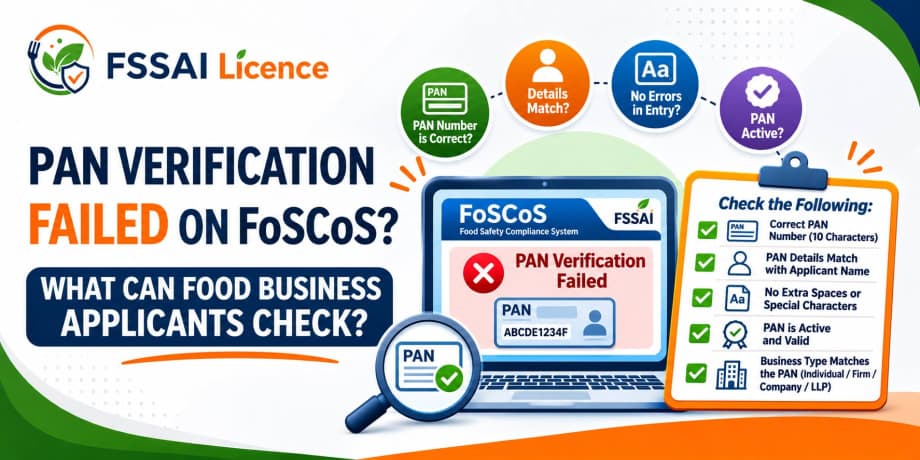
If FoSCoS PAN verification failed, compare the PAN and legal name entered in the application with the PAN record for the actual applicant. Then establish whether the problem is an incorrect entry, a PAN record that needs correction, or a portal issue that needs support; a failed check alone does not tell you which one it is.
Start by identifying what the system has stopped you from doing: saving a draft, submitting a new food licence application, renewing an existing authorisation or changing its details. The appropriate next step depends on that stage, and a successful PAN check is separate from approval of the food licence itself.
1. FoSCoS PAN verification failed: what the message means
1.1 A failed check is not a final licensing decision
FoSCoS, the Food Safety Compliance System, is the Food Safety and Standards Authority of India’s online system for food-business licensing and registration. A PAN validation failure means that the attempted check did not complete successfully. The message may not disclose whether the problem lies in the details submitted, the underlying identity record or the service handling the request.
A validation message at data-entry stage is different from a formal rejection of an application by the licensing authority. Look at the application status as well as the error: an unsent draft, a submitted application awaiting scrutiny and an application returned for clarification require different actions. Do not assume that a payment, a saved draft or an earlier submission has been cancelled merely because a later screen displays an error.
1.2 The food licence and the PAN check serve different purposes
A food licence or registration is the authorisation relevant to the food business under the Food Safety and Standards Act, 2006. PAN is an income-tax identifier used to identify the person or entity concerned. Passing an identity check does not establish that the premises, activity or application meets every food-safety requirement.
For someone searching for a “food licence”, the distinction matters: solving an FSSAI PAN validation failed message is one step in the application, not a substitute for completing the filing and receiving the appropriate authorisation. The same distinction applies if an adviser prepares the form for you; the operator remains responsible for understanding the status of the application and licence.
2. Who needs to address the PAN requirement?
2.1 New applicants and existing operators
Section 31 of the Food Safety and Standards Act, 2006 sets out the licensing and registration framework for food business operators. The applicable authorisation depends on the business and the relevant rules. PAN collection on FoSCoS is a procedural issue within that wider framework; it should not be confused with a rule that a successful PAN check alone grants permission to operate.
If the current FoSCoS application or renewal workflow asks for PAN information, the person making that filing needs to deal with the field before the affected step can proceed. An existing operator should also distinguish an account or profile request from an application for renewal or modification. An error in one place does not establish that every licence under the account has been amended or rejected.
Published reports describe a PAN-linking policy covering applications and existing operators, as well as a possible declaration for certain registration applicants without a PAN. The available evidence for this guide does not independently establish the current scope, deadline or availability of that declaration. An applicant without a PAN should use only an option actually available for the relevant filing or obtain guidance through the official support channel; do not enter another person’s PAN as a substitute.
2.2 Which entity’s PAN is relevant?
Identify the legal applicant before looking at the name of the outlet. A proprietor’s business may trade under a shop name different from the individual proprietor’s PAN name. A company, by contrast, is a separate legal entity: the director or authorised signatory who fills in the application is not automatically the applicant whose PAN should be used.
Partnerships and other entity types also need their identity assessed against the actual applicant shown in the application. The person who owns the premises, manages the account or signs a document may be different from the food business operator. If the application has been started in the wrong entity’s name, changing only the PAN entry may conceal a larger applicant-identity problem.
3. What to collect before troubleshooting
The following is a working checklist for diagnosing an error, not an official list of mandatory FoSCoS uploads. The documents requested for the food licence itself depend on the application category and the current portal checklist.
The PAN number and the name recorded for the person or entity intended to be the applicant.
The name, PAN and entity details entered in the affected FoSCoS profile or application, as visible to the account holder.
The application reference or existing licence or registration number, if one has been generated.
The exact error message, the screen or stage where it appeared, and the date and approximate time of the attempt.
For an entity applicant, a document that helps establish its legal name, such as its incorporation or constitution record, where relevant.
Any prior acknowledgement, submitted application copy or support correspondence relevant to the same problem.
3.1 Use supporting documents for a purpose
A PAN card or PAN record helps you compare the identifier and associated name; it does not by itself show that the correct business category or premises has been selected. A company’s incorporation record can help establish the entity’s legal name, while a licence copy can show the operator details previously issued. Use these records to answer specific questions rather than gathering unrelated papers.
For FSSAI PAN card verification, compare characters carefully, including the order of words and any initials appearing in the source record. Keep the source record and the application entry distinguishable in your notes. If you hand both to someone assisting with the filing, identify which document is the PAN evidence and which is the FoSCoS application record.
Protect the material you collect. A screenshot for support should show the relevant screen and message without exposing passwords, one-time passwords or unrelated personal data. Share a full PAN document only through an appropriate official or authorised channel when it is needed for that request.
4. Choose the right correction route
Before editing anything, decide which record is wrong or whether the cause is still unknown. The routes below have different effects; one should not be treated as an automatic substitute for another.
What you find | Where the issue sits | Next direction |
|---|---|---|
The intended applicant’s PAN record is correct, but the draft entry differs. | The entry being made in FoSCoS. | Use an available edit option in the relevant draft or workflow, then attempt the check again. |
The PAN record itself contains an error. | The underlying income-tax identity record. | Use the applicable official PAN correction route; retain its acknowledgement and revisit FoSCoS when the corrected record is available. |
The application or issued licence identifies a different legal operator. | The applicant or licence record, not necessarily the PAN record. | Review the stage-specific correction or modification route shown by FoSCoS; seek support if the appropriate route is unclear. |
The details appear consistent, but the same error persists. | The cause is not yet established. | Record the failed attempt and contact FoSCoS support with the relevant reference and error. |
A FoSCoS PAN details update and an FSSAI PAN correction are therefore not necessarily the same transaction. Updating an income-tax record does not itself prove that the FoSCoS application has been updated. Equally, changing a field in a draft does not alter the underlying PAN record.
Illustrative example: A company’s application contains the company’s PAN but uses a restaurant brand as the applicant name. If the company’s PAN record is accurate, the first question is whether the application should identify the company by its legal name. Correcting the company’s PAN merely to match the brand would target the wrong record.
5. How to work through the FoSCoS error
5.1 Prepare the correct entry
Access FoSCoS at foscos.fssai.gov.in through the account used for the affected application or licence. Open the relevant record rather than starting a second filing immediately. A duplicate application can make it harder to establish which record, payment or reference the support team should investigate.
Locate the affected transaction. Note whether it is a new registration or licence application, a renewal, a modification or an account-level request. Record the reference number if one exists.
Read the message in context. Capture the wording and identify the action attempted immediately before it appeared. A field-level validation message may need different handling from a general failure to load a page.
Identify the applicant. Compare the legal person or entity in the filing with the PAN holder. Keep trading names, signatories and the applicant entity distinct.
Compare the source and entry. Check the PAN and relevant name against the available PAN record. If a submitted application no longer permits editing, do not assume that an account-profile change will repair it.
Use the applicable route. Correct an editable entry if the current workflow permits it. If the source PAN record is wrong, use the Income Tax Department’s applicable PAN correction process; if the route in FoSCoS is unclear or the cause remains unresolved, contact FoSCoS support.
Return to the same transaction. Once the relevant correction is available, attempt the affected step again and inspect the resulting status. Complete any further submission steps that the portal requires.
5.2 Use the available correction route
For a new filing, FoSCoS uses Form A for registration and Form B for a licence application. Those form references identify the type of food-business filing; they do not establish that every field is editable at every stage. The screen you can use may depend on whether the application is a draft, has been submitted, or has been returned for clarification.
If the application has already been submitted, preserve its reference and follow the response or correction facility available for that application. For an issued licence, treat a change to the licence record separately from an update to a user profile. The supplied evidence does not establish that either action automatically updates the other.
When a FoSCoS PAN verification failed message persists despite consistent details, describe the problem as an unresolved validation failure rather than asserting that the tax database or portal is defective. That distinction gives support the facts needed to investigate without directing them toward an unproven cause.
6. Mistakes that can make the problem harder to resolve
Using a convenient PAN instead of the applicant’s: A director, employee or adviser may have access to the account, but account access alone does not make that person the food business operator.
Changing names in several places at once: If the source record, draft and supporting documents are all edited without a record of the original entries, it becomes difficult to identify which change resolved or created the mismatch.
Repeatedly submitting without checking status: Multiple attempts may leave the operator unsure which application or payment relates to the active filing. Work from the existing reference where possible.
Assuming a screenshot is an acknowledgement: An image of a screen can document an error, but it does not by itself establish that an application was submitted or a licence granted.
Sharing credentials to obtain help: An adviser can review records and help prepare a support request without being given a password or one-time password.
Treating a trade name as proof of legal identity: A brand can appear on business materials while the applicant is a different named person or entity. Resolve the legal identity rather than forcing every document to use the brand.
Do not use someone else’s PAN to get past an FSSAI PAN name mismatch. A successful screen response would not cure an application made in the wrong operator’s name and could make a later correction harder.
If an adviser has made entries on your behalf, ask for the application reference and a copy of the submitted information. That allows you to check the applicant identity and status without relying solely on a verbal assurance that the problem has been fixed.
7. Fees, timing and the licence deadline
7.1 Separate the possible charges
There are several potential costs, but they do not all arise from the same action. A food licence or registration application can carry a government fee under the applicable schedule. A professional may separately charge for preparing or managing the filing. A PAN correction, if needed, is a separate service from the food-business application and may have its own applicable charges.
The supplied evidence does not establish a current standalone government fee for retrying PAN validation on FoSCoS. It also does not support a reliable fee table for every licence category or correction route. Before paying, identify the service being purchased, the government amount shown for that transaction and any separate professional charge; keep the payment receipt against the correct application reference.
Be careful with a quote described simply as “food licence fees”. Ask whether it includes the government application fee, any professional service fee and assistance with an unresolved PAN error. A quote for preparing an application should not be assumed to include an income-tax PAN correction or a later licence modification unless the provider says so.
7.2 Plan around the blocked filing
An FSSAI PAN verification error can create two different timing problems: time spent diagnosing the error and time needed for the affected filing to be processed after it is submitted. A saved draft is not evidence that the submission stage has been completed. Where a renewal is involved, use the expiry date on the existing authorisation and the applicable renewal requirements to plan the filing.
No reliable universal duration for PAN troubleshooting or validation is established by the supplied evidence. A mistyped entry that can be edited may be dealt with in the application, while a correction to an underlying PAN record or a support investigation introduces a separate dependency. Allow time for both the identity issue and the remaining food-licensing process instead of assuming that solving one completes the other.
The available evidence also does not establish a current, generally applicable PAN-update deadline for every existing operator. Do not infer that the date of a published report is your personal due date. Use the date and instructions applicable to your actual filing, licence or official notice, and act early enough to resolve a blocked transaction.
8. What evidence shows that the issue is resolved?
8.1 Validation, submission and approval are separate events
The strongest evidence depends on what you need to prove. A screen showing that you can proceed past a PAN field indicates progress in that workflow. An application acknowledgement or reference records a submission. An issued licence or registration certificate records the authorisation granted. None should be described as proof of an event it does not show.
Keep the version of the applicant details that was submitted, the relevant acknowledgement and any payment receipt together. If FoSCoS returns an application for clarification, retain the request and your response. This gives the operator a record of what was provided and when, without treating an unresolved PAN verification unsuccessful FoSCoS message as a formal outcome.
If the underlying PAN was corrected, keep the correction request acknowledgement and the updated record separately from the food-licence file. The two records serve different purposes: one relates to the tax identifier, the other to the food-business transaction. A later reviewer can then see which source was used when the application was completed.
8.2 A useful support record
A concise support request should identify the transaction type, application or licence reference, error wording, time of the attempt and the field or action involved. State whether the relevant details appear consistent with the PAN record, and explain what has already been attempted. Attach only information requested or necessary to demonstrate the issue.
Record the support reference and any instructions received. If support requests a correction in a particular application, link the response to that reference rather than assuming that a similar-looking error in another account has the same cause.
9. What happens after the PAN issue is resolved?
9.1 Keep the licence current
Once the blocked step works, finish the remaining application process and follow the status through to the authority’s decision. If clarification is requested, respond through the available application channel and keep the acknowledgement. The appropriate food-business authorisation, rather than a passed PAN check, is the document to retain for licensing purposes.
For an existing operator, maintain a record of the licence or registration, its validity period and the details of the legal operator. When a relevant business detail changes, assess whether the applicable FoSCoS workflow calls for an update or modification. A profile entry should not be treated as proof that the certificate itself has changed.
Assign one person to monitor application messages and renewal dates, even if an external service provider prepares filings. The operator can ask the provider for copies of submissions and receipts, then compare them with the business’s own records. This reduces the risk that a request for clarification goes unnoticed while staff believe the adviser has completed the work.
9.2 Understand the consequence of operating without required authorisation
A PAN authentication problem is not, by itself, evidence that a statutory penalty has been imposed or that an existing licence has been cancelled. The separate legal concern is whether the business holds the authorisation required for its operation. Section 63 of the Food Safety and Standards Act addresses certain cases of carrying on a food business without a licence; its application depends on the facts and the statutory exceptions.
Do not assume that a pending draft or a successful identity check gives the same protection as an issued authorisation. If a new business cannot complete its filing, or an existing authorisation is approaching expiry, establish the status of the food licence rather than treating the PAN error as an isolated technical inconvenience.
10. Action list for your application or existing licence
Use the action that matches your current position. If you are preparing a new application, identify the legal operator and work through the relevant Form A or Form B workflow on FoSCoS. If the PAN record itself is wrong, address that record through the applicable Income Tax Department process before relying on a later FoSCoS retry.
If an application is already submitted, work from its reference and any clarification request. If you hold an existing licence, note its expiry date, inspect the affected renewal or modification workflow, and keep the existing certificate separate from any profile-update record. If the cause remains unclear, send FoSCoS support a focused error report rather than creating an unexplained second application.
For assistance with preparing a food-business filing, FSSAI Licence offers FSSAI Registration services. Keep your own copies of the application, acknowledgements and issued certificate regardless of who prepares the filing.
Review your current compliance status and take corrective action before the due date